
Cummins PCC 2100/3100/3200 via ProtoNode (V3)
This topic is the install guide for the after-market gateway (part# A0009887841) with the universal harness (part# A0009887770, A0009887772) when utilizing Cummins PCC 2100/3100/3200 PowerCommand® control systems with ProtoNode.

For Modbus communication and Generac Link integration a ProtoNode will need to be installed.
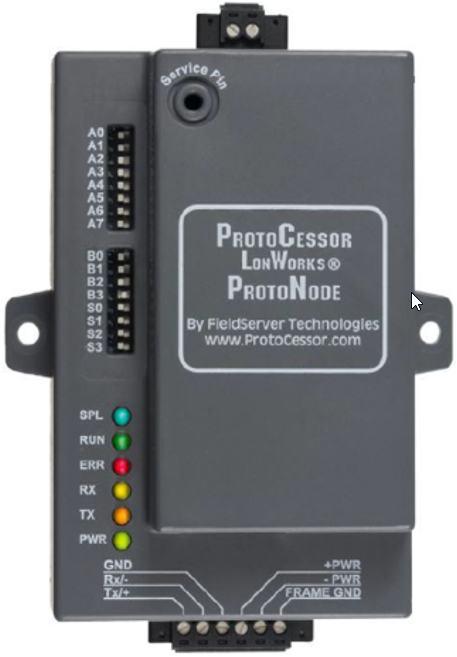
PowerCommand Control (PCC) 2100/3100/3200 natively supports LonWorks communication protocol.
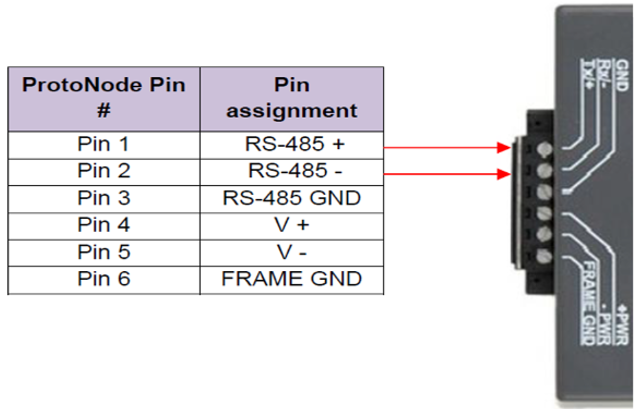
ProtoNode Terminals
Generac Link-Site Deployment Controller Selection:
Cummins Protonode-RS485
Modbus Communication Settings and Notes
Settings should match values provided in this table.
Address: 1 | Parity: None |
Baud Rate: 19200 | Stop: 1 |
Template: 1 | |

If different settings are required, please contact Support.
Dip Switch Settings
(On = To Right)
Setting | Dip Switch | Position |
|---|---|---|
Modbus Address | A0 | On |
A1 | Off | |
A2 | Off | |
A3 | Off | |
A4 | Off | |
A5 | Off | |
A6 | Off | |
Baud Rate | A7 | On |
B0 | Off | |
B1 | Off | |
Comm Settings | B2 | Off |
B3 | Off | |
Template | S0 | Off |
S1 | Off |
DIP switch changes should be made will Protonode is powered down.
Generac Gateway Side Terminations | Description | Harness Wire Color | Equipment Side Terminations |
|---|---|---|---|
2 | DC+ | A0009887772 Red | Pin 4 |
1 | DC- | A0009887772 Black | Pin 5 |
8 | Data + | A0009887770 Orange / White | Pin 1 |
9 | Data - | A0009887770 White / Orange | Pin 2 |
10 | Data GND | A0009887770 Blue/ White | Pin 3 |
Harness Relay #1 | COM | A0009887772 Blue | *2-Wire Start (see table below) |
N/O | A0009887772 White / Blue |
2 Wire Terminations by Controller
Controller | Blue | White / Blue |
|---|---|---|
PCC 2100 | TB1-1 | TB1-20, 21, or 22 |
PCC 3100 | TB1-5 | TB1-3 or TB1-4 |
PCC 3200 | TB8-4 | TB8-5 |
Gateway Connection Ports
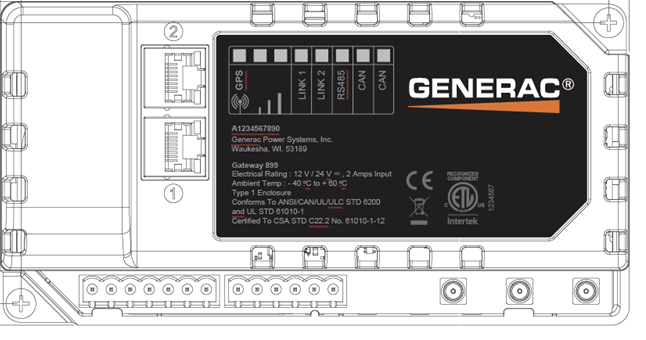
Pin | Connector | Description |
1 | A | Plant Supply –ve |
2 | Plant Supply +ve | |
3 | Digital Output A | |
4 | Digital Output B | |
5 | Flexible Sender Common | |
6 | Flexible Sender A | |
7 | Flexible Sender B | |
1 | B
| RS485 A |
2 | RS485 B | |
3 | RS485 Screen | |
4 | CAN H | |
5 | CAN L | |
6 | CAN Screen |
Check out our knowledge base and support center for information on any technical questions.